
Scenery That Responds to Icons
Scene elements are arranged around detected Mac desktop icon positions to bring folders and files into a more unified view.
Turn your Mac desktop into a more cohesive scene. SceneLive places animated Meadow Hours, Rainy Metropolis, Open Sky and Sunny Bay elements around your desktop icons using a transparent overlay—not by replacing your wallpaper.
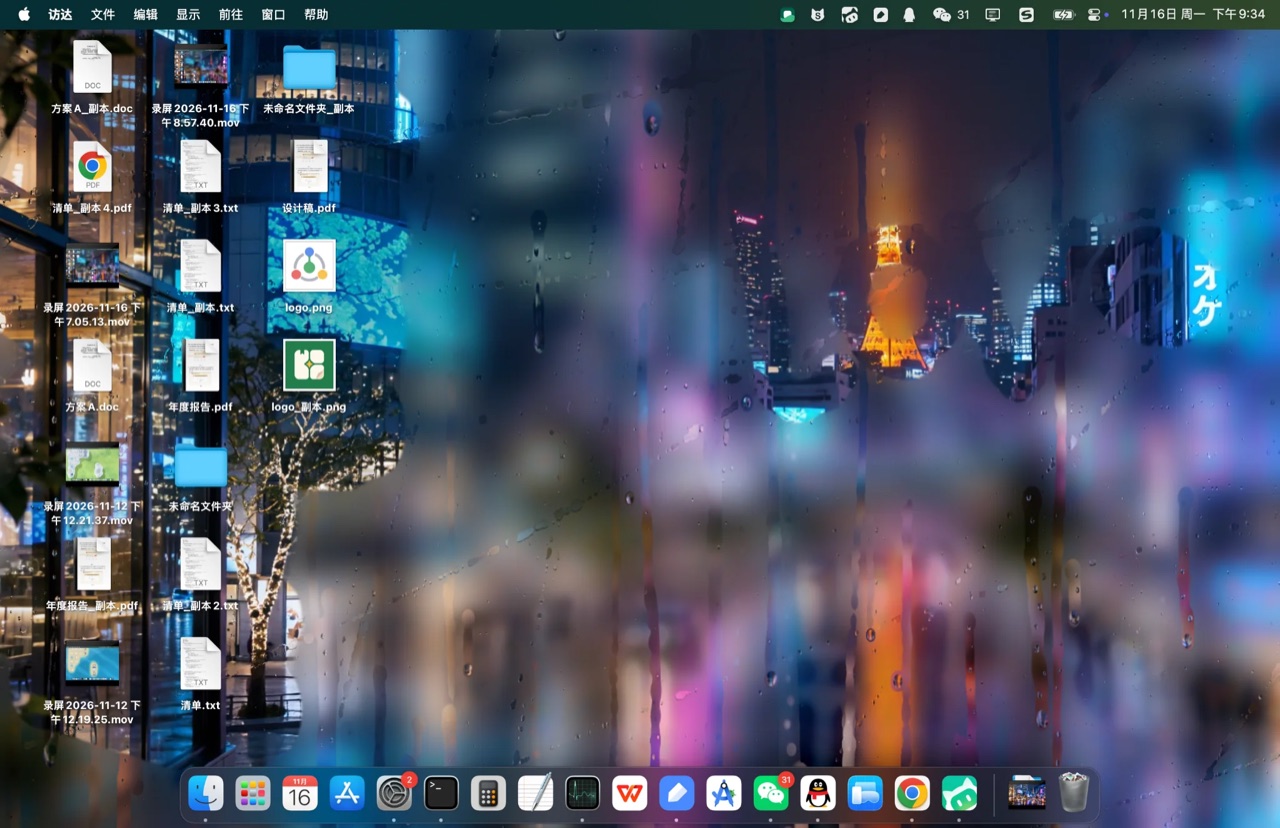
Instead of simply playing an animation behind your icons, SceneLive uses a transparent overlay to adapt decorative scenery to detected desktop icon positions.
Scene elements are arranged around detected Mac desktop icon positions to bring folders and files into a more unified view.
All four scenes are drawn over your desktop scene without modifying the original wallpaper file or replacing Finder icons.
Switch between Meadow Hours, Rainy Metropolis, Open Sky and Sunny Bay—each with its own real macOS demonstration video. More scene styles can be added as they become available in released versions.
Explore the real Mac demonstrations of the Meadow Hours, Rainy Metropolis, Open Sky and Sunny Bay scenes.
Open pasture bathed in warm late-afternoon light. Grass sways in the breeze as scene elements arrange themselves around files and folders, creating a calm, unhurried Mac desktop composition.
Preview Meadow HoursA city lights up after dark. Building silhouettes and neon haloes spread around your desktop icons, so each one feels like it sits in its own block while rain slides down the glass.
Preview Rainy MetropolisSoft green meadow scenery surrounds files and folders. The theme follows detected icon positions to create a gentle, nature-inspired desktop composition.
Preview Open SkyThe bay scene blends Mac desktop icons into a sandy island landscape. The real demo shows moving water, seabirds, and how the scenery looks across different icon arrangements.
Preview Sunny BayThese descriptions reflect the current product design. Final functionality and permissions depend on the released build.
No. The design uses a transparent overlay for scene elements and does not require editing your original wallpaper file or icon assets.
The scene adjusts using detected icon positions. Detection depends on macOS behavior and the Accessibility permission. If the layout looks out of date, toggle the overlay off and on from the menu bar.
SceneLive reads desktop icon positions so scenery can be arranged around them. Enable SceneLive under System Settings → Privacy & Security → Accessibility. Without it, the overlay still shows the scene, but it cannot follow your icons.
Four scenes are available—Meadow Hours, Rainy Metropolis, Open Sky and Sunny Bay—each demonstrated with real MP4 recordings you can switch between on this page. The released theme catalog may differ.
Check that SceneLive is enabled under System Settings → Privacy & Security → Accessibility—this permission controls whether icon positions can be read. You can also toggle the overlay off and on from the menu bar, or quit and reopen SceneLive. If the overlay still does not appear, contact us using the email in the footer.
A menu bar toggle shows or hides the transparent overlay; hiding the scene does not quit the app.
Download SceneLive 1.1.1 for macOS as a DMG installer—pick the build that matches your Mac's chip and explore icon-aware desktop scenery.
DMG installer · Version 1.1.1 · Apple Silicon & Intel